Video · 5 min read
Do you need an explainer video? Five signs you do
The short answer
An explainer video is worth making when your product or service takes more than a sentence to explain, when customers ask the same questions on every call, or when your ads need a stronger hook. Keep it to 60–90 seconds: problem, solution, how it works, proof, one call to action.
Key points
- 71% of people in Wyzowl’s 2026 survey say 30 seconds to 2 minutes is the most effective length.
- Lead with the customer’s problem, not your company.
- Make one long version, then cut short versions for social and ads.
What an explainer video is
An explainer video is a short video, usually 60–90 seconds, that explains what you do and why it matters to the viewer. It can be animated, filmed, or a mix of screen recordings and motion graphics. Its job is simple: help a visitor understand you quickly enough to take the next step.
What the data says
Wyzowl’s State of Video Marketing 2026 surveyed 266 marketers and consumers in late 2025. Video is now standard, and explainers are one of the most-watched formats.
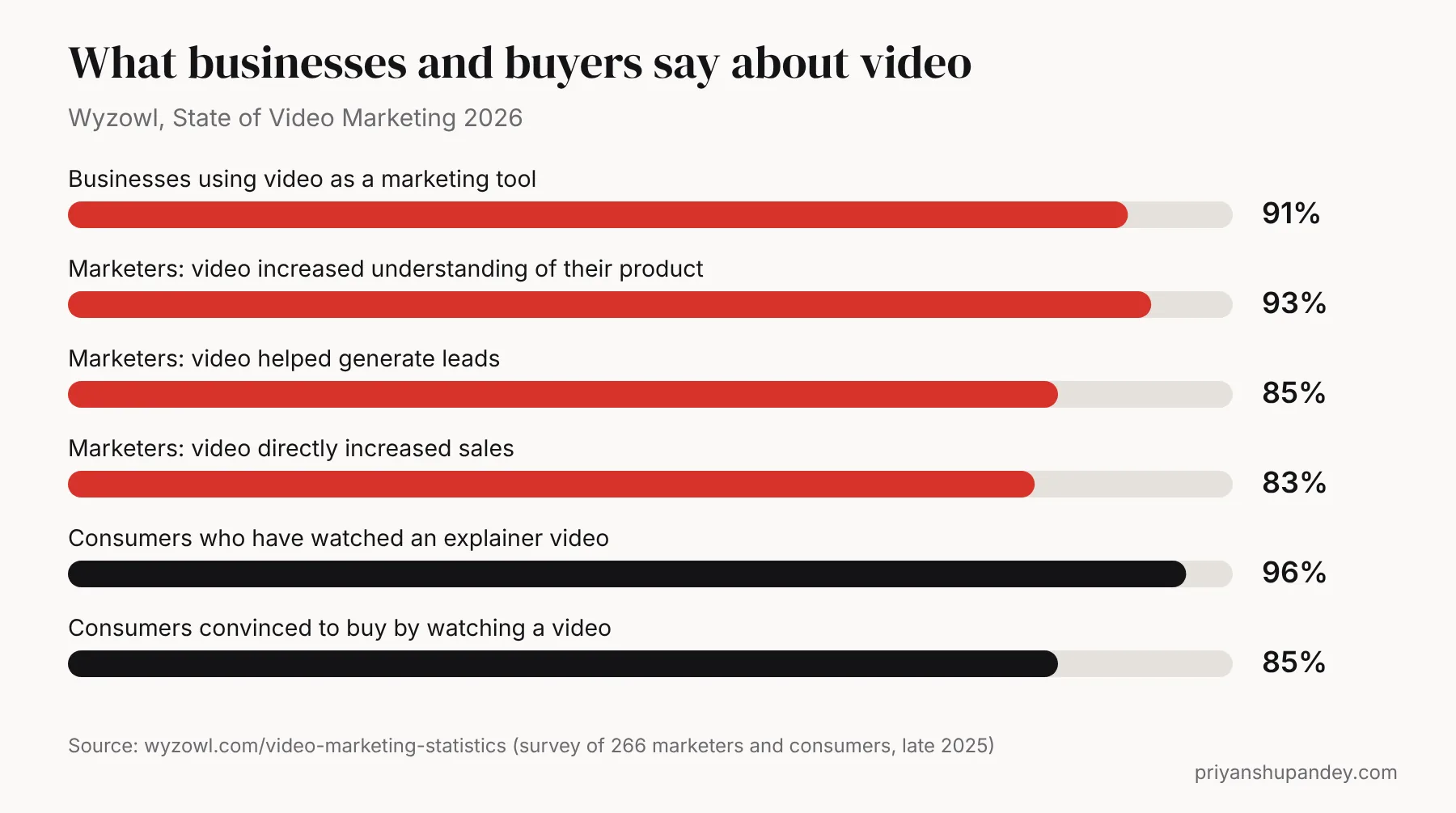
These are survey answers, not guarantees. A poor video won’t do this; a clear one that answers real questions often does.
Five signs you need one
- You explain the same thing on every call. A video answers it before the call, so calls are shorter and better qualified.
- Visitors leave your key page quickly. If Google Analytics shows short visits on your main service or product page, a video can hold attention while the message lands.
- Your service is new, technical or invisible. Software, finance, energy and B2B services are hard to picture. Animation makes them concrete.
- Your ads need a stronger hook. A 15-second cut of an explainer often outperforms a static image in social ads.
- Your customers prefer to watch. In Wyzowl’s survey, 63% of consumers said a short video is how they’d most like to learn about a product.
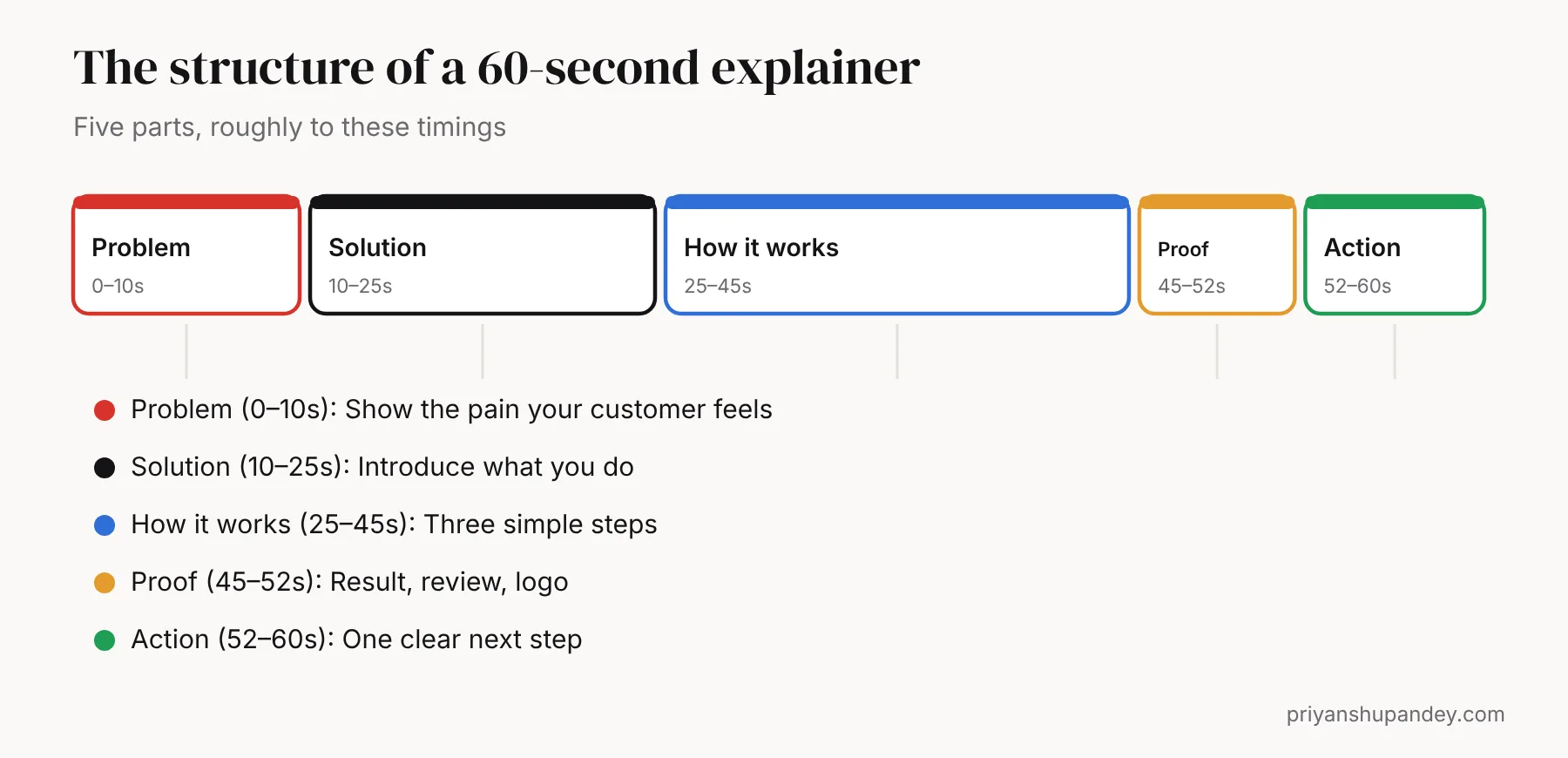
The 60-second structure that works
| Part | Time | What to say |
|---|---|---|
| Problem | 0–10s | The frustration your customer feels, in their words |
| Solution | 10–25s | What you do, in one sentence |
| How it works | 25–45s | Three simple steps |
| Proof | 45–52s | A result, review or well-known client |
| Action | 52–60s | One next step: book, call, try, buy |
About 150 spoken words fill 60 seconds at a natural pace. If your script is longer, cut it; don’t speed up the voice-over.
How to write the script in five steps
- Write the problem as your customer would say it. Use phrases from sales calls and reviews.
- State your solution in one sentence. If it takes two, simplify.
- Choose three steps that show how it works. Leave out features nobody asks about.
- Pick one piece of proof. A number, a review or a recognisable client.
- End with one action. Two calls to action halve the response to each.
Example script: a 60-second explainer for a plumbing firm
| Time | Voice-over |
|---|---|
| 0–10s | “Boiler stopped on the coldest morning of the year? And the first three plumbers you called can’t come until next week?” |
| 10–25s | “At Brightwater Plumbing, we fix boilers across Reading the same day, with a fixed price agreed before we start.” |
| 25–45s | “Send a photo on WhatsApp. We give you a price and a time slot. Our Gas Safe engineer arrives, fixes it, and tidies up.” |
| 45–52s | “That’s why more than 400 Reading homeowners have given us five stars on Google.” |
| 52–60s | “Boiler trouble? Message us now for a same-day slot.” |
That is about 120 words: room to breathe at a natural pace. (Brightwater Plumbing is an invented example.)
Where to use it
- Top of your homepage or key service page. Add captions: many people watch with the sound off.
- Sales emails and proposals. A link with a thumbnail gets clicked more than an attachment.
- Social media and ads. Cut 15–30 second versions in vertical 9:16 and square 1:1. My free video size guide lists every platform’s sizes.
- YouTube. Upload it with a clear title and description so it can appear in Google video results.
How an explainer video is made
- Brief (day 1): a short call about your customer, their problem, your offer and where the video will be used.
- Script (days 2–5): about 120–150 words, written and agreed before anything is designed. This is the step that decides whether the video works.
- Storyboard and style (week 2): sketches of each scene and two or three still frames in your brand colours.
- Voice-over and music (week 2): a professional voice and licensed music, chosen from samples.
- Animation or edit (weeks 3–4): scenes built and timed to the voice-over.
- Changes and delivery: usually two rounds of changes, then the final files in 16:9, 1:1 and 9:16 with captions.
Explainer ideas for local and service businesses
| Business | What the video could explain |
|---|---|
| Dental clinic | How Invisalign or implants work, step by step, and what treatment costs cover |
| Solar installer | How panels and batteries cut bills, and what happens on installation day |
| Accountant | What’s included in a monthly package and how bookkeeping, VAT and payroll fit together |
| Software or app | The one problem it solves, shown with three screens |
| Builder | How an extension project runs, from drawings to handover |
How to tell if it’s working
- Watch time: on YouTube or your video host, see where viewers drop off. A big drop in the first 10 seconds means the opening needs work.
- Page behaviour: in Google Analytics 4, compare engagement and enquiries on the page before and after adding the video.
- Sales calls: ask new customers whether they watched it. Shorter, better-informed calls are a win in themselves.
- Ads: compare cost per lead for the video ad against your image ads over the same period.
Animated, live action or screen recording?
| Type | Best for | Watch out for |
|---|---|---|
| 2D motion graphics | Services, software, finance, anything abstract | Needs a strong script to avoid feeling generic |
| Live action | Trades, clinics, restaurants, people-led businesses | Needs good light and sound |
| Screen recording | Apps and software demos | Keep it short and zoomed in |
| 3D product animation | Physical products, features you can’t film | Needs product photos or CAD files |
Need help with this?
Video editing, done for you.
I plan it, my specialist team delivers it, and you get a fixed written quote after a free call.