Websites · 6 min read
How much does a business website cost in the UK?
The short answer
The price of a business website is set by four things: how many unique page designs it needs, the platform, who writes the content, and any custom features such as bookings or logins. A fair quote lists all four, plus the yearly running costs. Typical UK price ranges are in the questions at the end of this guide.
Key points
- Compare quotes by scope, not by the headline number.
- Running costs (hosting, plugins, apps, care) matter as much as the build.
- You should own the domain, hosting account and every file.
What sets the price of a website
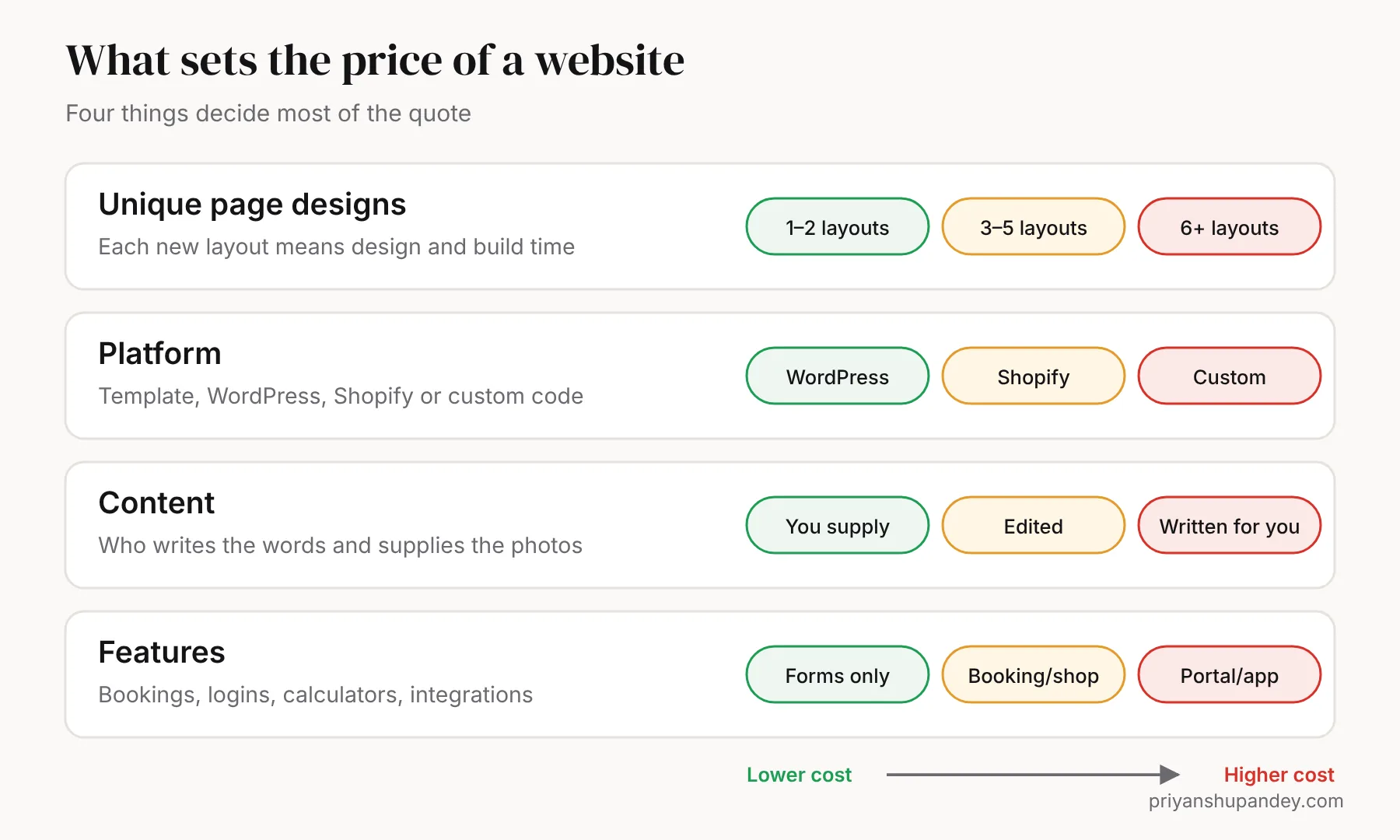
Two quotes for “a website” can differ by thousands of pounds and both be fair, because they describe different websites. Almost all of the difference comes from four decisions.
1. Unique page designs
A designer creates each distinct layout once; every page that reuses it costs far less. A site with a homepage, one service-page layout and a contact page is quick to build. A site where every page has its own design takes several times longer. When you compare quotes, ask: how many unique layouts are included?
2. The platform
WordPress suits service businesses that want enquiries and plenty of pages. Shopify suits shops that sell products online and want payments, stock and delivery handled for them. Custom code suits anything templates can’t do, such as client portals, booking systems or dashboards. Each has different build and running costs, covered below and in my Shopify vs WordPress guide.
3. Content
Writing the words, choosing photos and producing video often takes longer than the design. If you supply finished text and photos, the price drops. If you want the copy written for you, with keyword research for each page, expect that to be a separate line on the quote.
4. Features
A contact form is standard. Online booking, quote calculators, product filters, logins, multi-language pages and integrations with your CRM or accounts software each add time to design, build and test.
Template or custom design?
A template is a ready-made design adapted with your logo, colours and words. It’s quicker and cheaper, and fine for a first website. A custom design is planned around your customers and services from scratch. It costs more but usually converts better, because every page is built around what your visitors need to see before they call.
| Template | Custom design | |
|---|---|---|
| Time to launch | 1–2 weeks | 3–5 weeks |
| Looks unique | Partly | Yes |
| Built around your customers’ searches | Rarely | Yes |
| Best for | Testing a new business | Businesses that rely on enquiries |
Freelancer, agency or consultant?
Who builds the site affects price as much as what is built.
| Option | Good at | Watch out for |
|---|---|---|
| Marketplace freelancer | Lowest cost for a defined task | You manage the project; quality varies; they may disappear after launch |
| Agency | Full team, process, support | Higher prices; you may deal with an account manager, not the people doing the work |
| Independent consultant with a team | One accountable lead plus specialists | Check they have real specialists for design, development and SEO |
Example: what a 10-page trade website includes
Here’s a realistic scope for a plumbing or electrical business that wants calls from three nearby towns. Use it to check whether a quote covers the same work.
- Pages: home, about, contact, four service pages (emergency repairs, boiler or rewire work, installations, maintenance), three area pages.
- Layouts: four unique designs (home, service, area, contact), reused across the rest.
- Content: service and area pages written from a 30-minute call, plus your own job photos.
- Features: click-to-call, WhatsApp button, quote form with photo upload, Google reviews shown on the site.
- SEO: keyword research, titles and descriptions, LocalBusiness schema, sitemap, Search Console and GA4 set up.
- Launch: speed and phone testing, redirects from any old site, a 30-minute training call.
What every quote should include
Whatever you pay, some things should never be extras. Use this as a checklist against any quote you receive.
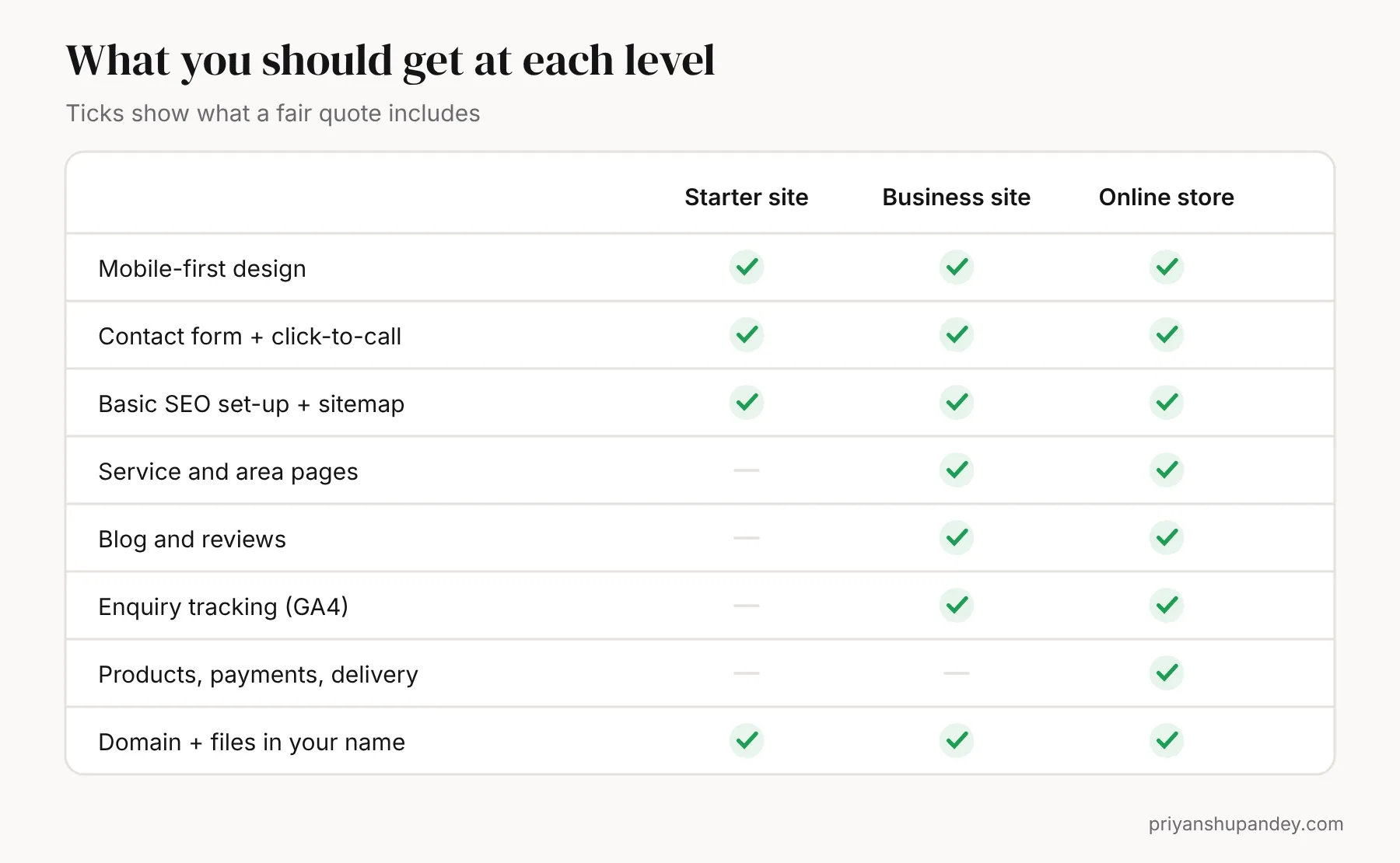
- Mobile-first design. Most local searches happen on phones, so the site should be designed for a phone first and tested on real devices.
- Speed. Pages should load quickly on mobile data. Google’s Core Web Vitals measure this, and you can test any page free with PageSpeed Insights.
- SEO foundations. A unique title and description for every page, one main heading, structured data, a sitemap, and the site added to Google Search Console.
- A form that reaches you. Tested end to end, with spam protection, plus click-to-call and WhatsApp buttons for phones.
- Tracking. Google Analytics 4 set up so you can see which pages bring enquiries.
- Ownership. The domain, hosting account, code, design files and content in your name, with the logins handed to you.
- Training. A short session so you can change text, photos and blog posts yourself.
The running costs people forget
The build is a one-off. These costs come every month or year, and they are where cheap quotes often hide the real price.
| Cost | What it is | Who it applies to |
|---|---|---|
| Domain name | Your web address, renewed yearly | Everyone |
| Hosting | The server your site runs on | WordPress and custom sites (included in Shopify plans) |
| Platform plan | Monthly subscription | Shopify and website builders |
| Premium plugins or apps | Paid extensions for forms, SEO, reviews, bookings | WordPress (yearly) and Shopify (monthly) |
| Card fees | A percentage of each online payment | Anyone taking payments |
| Care plan | Updates, backups, security and small edits | Optional, but sensible for WordPress |
Ask every web designer for a written list of yearly running costs before you sign. If renewal prices aren’t stated, ask what hosting costs in year two, not just year one.
How to compare quotes in five steps
- Write a one-page brief. List the pages you need, the main action you want visitors to take (call, book, buy), and three websites you like.
- Send the same brief to three providers. Different briefs produce quotes you can’t compare.
- Put the quotes side by side. Compare the number of unique layouts, pages, content writing, features, revisions and timeline.
- Add the running costs. Work out the cost over three years, not just the build, so a cheap build with expensive plugins doesn’t surprise you.
- Check ownership and support. Confirm in writing that you own everything and what happens if you need a change after launch.
How to spend less without getting a worse site
- Write your own first drafts. Nobody knows your services better. A designer can polish them faster than writing from nothing.
- Take your own photos. Real photos of your team and work beat stock photos, and phones are good enough in daylight.
- Launch with fewer pages. Start with your main services and best towns, then add pages each month.
- Reuse layouts. Ask for fewer unique designs and more pages built from them.
- Skip features you won’t use in the first year, such as live chat or multi-language versions.
Red flags in a website quote
- The designer registers the domain in their own name.
- No mention of mobile testing, speed or SEO set-up.
- A monthly fee with no clear list of what it covers, and no exit terms.
- Unlimited revisions with no defined scope, which usually means delays.
- A guarantee of “page one on Google”. Nobody can promise that honestly.
Is a professional website worth it?
A website earns its cost back when it brings enquiries you would not otherwise get. For a trade or local service, that can be a handful of jobs. To estimate it for your own business, use my free website ROI calculator: enter your monthly visitors, enquiry rate and average job value to see what a better site could be worth.
Need help with this?
Website design, done for you.
I plan it, my specialist team delivers it, and you get a fixed written quote after a free call.